Hi there. I just had a case within Prisma SASE as always and I thougth its good that we work with userid based rules for giving users the freedom for mobility, but the hard rule at the end of the rulebase where we just blindly block all unknown users is not so friendly.
Or if you still have a rule after the Prisma SASE migration that allows access from user networks without user identification to some other resources, this rule could be closed with a informational response page for all user not following the corporate procedure to identify theirself and the firewal has no ip to user mapping for them.
How could we gently inform the users only who are not identified, to do it, in a large scale enviroment?
In a rule you can select different types of users, as a source user:
admin@PA-VM# set rulebase security rules internet_access_new_unauthenticated source-user [ Start a list of values. Alice user Alice Bob user Bob Carol user Carol any any user finance user-group finance infrastructure user-group infrastructure internet user-group internet known-user any known user pre-logon prelogon client machine unknown unknown user admin@PA-VM# |
on the list you see Alice, Bob and Carol users and the finance, infrastructure and internet groups that was created in the local user database.
The rest like known-user, pre-logon, unknown are default users for different cases. in this post we focus on the unknown users.
Lets bring up a firewall very quickly for demonstration purposes. I used the PA-VM-ESX-10.1.9 ova file with VMWare Player with the following interface settings:
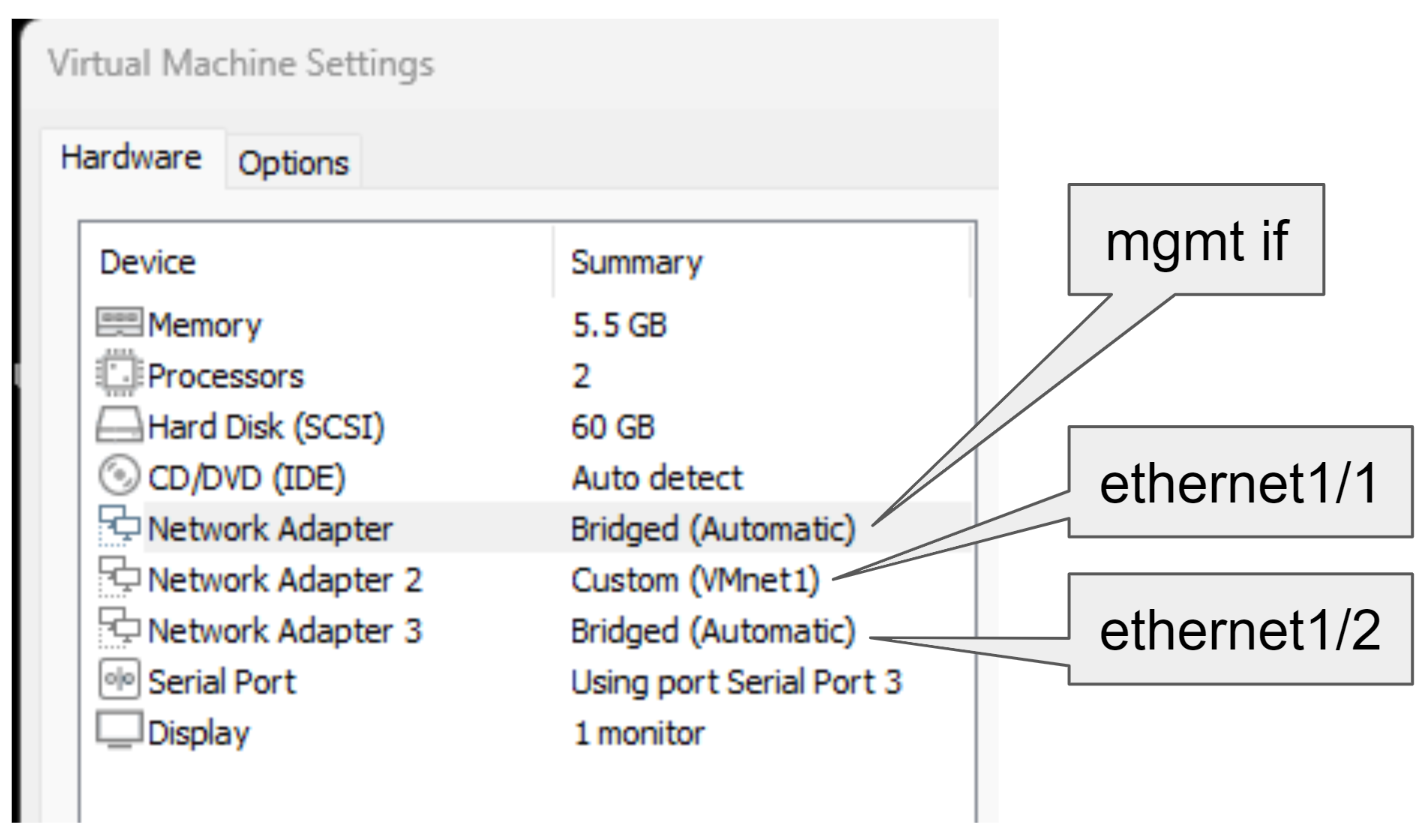
Lets configure it with all the steps required:
- setup the management profile
- setup the interfaces
- setup the virtual-router
- setup the zones
- setup the custom url category for itsecworks.com
- setup the url-filter profile and set the custom url category for itsecworks.com to block
- create the security rules and add the url-filter profile
- create the nat rules
set network profiles interface-management-profile trust https yes set network profiles interface-management-profile trust ssh yes set network profiles interface-management-profile trust userid-service yes set network profiles interface-management-profile trust ping yes set network interface ethernet ethernet1/2 layer3 dhcp-client set network interface ethernet ethernet1/1 layer3 ip 192.168.65.10/24 set network interface ethernet ethernet1/1 layer3 interface-management-profile trust set import network interface [ ethernet1/2 ethernet1/1 ] set network virtual-router default interface [ ethernet1/2 ethernet1/1 ] set zone trust network layer3 ethernet1/1 set zone untrust network layer3 ethernet1/2 set profiles custom-url-category itsecworks.com type "URL List" set profiles custom-url-category itsecworks.com list [ itsecworks.com *.itsecworks.com ] set profiles url-filtering url_filter block itsecworks.com set rulebase security rules internet_access_new profile-setting profiles url-filtering url_filter set rulebase security rules internet_access_new to untrust set rulebase security rules internet_access_new from trust set rulebase security rules internet_access_new source any set rulebase security rules internet_access_new destination any set rulebase security rules internet_access_new application any set rulebase security rules internet_access_new service application-default set rulebase security rules internet_access_new action allow set rulebase security rules internet_access_new log-start yes set rulebase security rules internet_access_new rule-type interzone set rulebase nat rules nat to untrust set rulebase nat rules nat from trust set rulebase nat rules nat source any set rulebase nat rules nat destination any set rulebase nat rules nat service any set rulebase nat rules nat to-interface ethernet1/2 set rulebase nat rules nat source-translation dynamic-ip-and-port interface-address interface ethernet1/2 |
Lastly we have to route the traffic from our laptop to the virtual Firewall, since its not my default gateway. I did it on my windows with the following command:
Now if we open the itsecworks.com page we should see the block page from Palo Alto Firewall.
Sidenote1: Custom url category with url filtering profile works without license! You can safely skip the warning message on it after the commit.
Sidenote2: Watch out! Chrome can use certificate pinning and you dont see the response page generated by the firewall. Use an incognito window to makes sure chrome does know the page in test.

Lets setup our userdatase and the groups locally in the firewall for the demo:
- enable userid on the trust interface
- add some users and user groups to the local database
set zone trust enable-user-identification yes set shared local-user-database user Alice phash $5$aqtyibvf$PuDov9y.aZ41jsOrQedwWXJk742SZxpt5B21q5u19U9 set shared local-user-database user Bob phash $5$oaxrmmpj$.vR6cIX3DT73AWKS2jyAw8zm7N7oOAdGifSpBtv6Pe9 set shared local-user-database user Carol phash $5$qlkgilgk$gC2sqY579jxVgAnd.JRKWuGemRjLXDA865uERv0Cqv3 set shared local-user-database user-group finance user Alice set shared local-user-database user-group infrastructure user Bob set shared local-user-database user-group internet user [ Alice Bob Carol ] |
and create 2 rules. The one with the name internet_access_new contains an url-filtering profile that allows access to the custom url category. This rule uses the source user group internet from our local database:
set profiles url-filtering url_filter alert itsecworks.com set rulebase security rules internet_access_new profile-setting profiles url-filtering url_filter set rulebase security rules internet_access_new to untrust set rulebase security rules internet_access_new from trust set rulebase security rules internet_access_new source any set rulebase security rules internet_access_new destination any set rulebase security rules internet_access_new application any set rulebase security rules internet_access_new service application-default set rulebase security rules internet_access_new action allow set rulebase security rules internet_access_new log-start yes set rulebase security rules internet_access_new rule-type interzone set rulebase security rules internet_access_new source-user internet |
The next rule with the name internet_access_new_unauthenticated and with the url_filter-unauthenticated url filter profile blocks the access to the custom url category and very imortant this rule uses the source user unknown.
set profiles url-filtering url_filter-unauthenticated block itsecworks.com set rulebase security rules internet_access_new_unauthenticated profile-setting profiles url-filtering url_filter-unauthenticated set rulebase security rules internet_access_new_unauthenticated to untrust set rulebase security rules internet_access_new_unauthenticated from trust set rulebase security rules internet_access_new_unauthenticated source any set rulebase security rules internet_access_new_unauthenticated destination any set rulebase security rules internet_access_new_unauthenticated application any set rulebase security rules internet_access_new_unauthenticated service application-default set rulebase security rules internet_access_new_unauthenticated action allow set rulebase security rules internet_access_new_unauthenticated log-start yes set rulebase security rules internet_access_new_unauthenticated rule-type interzone set rulebase security rules internet_access_new_unauthenticated source-user unknown set rulebase security rules internet_access_new_unauthenticated category any |
From now on if the user is identified and there is an ip to user mapping, the page will be accessible, but if the user is unknown the page itsecworks.com will be blocked with the default URL Block response page
lets test it, add a user ip mapping manually from the cli:
admin@PA-VM> set user-id data '<uid-message><version>2.0</version><vsys>vsys1</vsys><type>update</type><payload><login><entry name="Alice"ip="192.168.65.1"timeout="20"/></login></payload></uid-message>' 2.0 admin@PA-VM> show user ip-user-mapping all IP Vsys From User IdleTimeout(s) MaxTimeout(s) --------------------------------------------- ------------------- ------- -------------------------------- -------------- ------------- 192.168.65.1 vsys1 XMLAPI alice 1189 1189 Total: 1 users |
and the page can be opened for the user Alice. Confirmed by the traffic logs as well:

Now here comes the tricky part. The URL Block response page contains some objects that the firewall fills in:
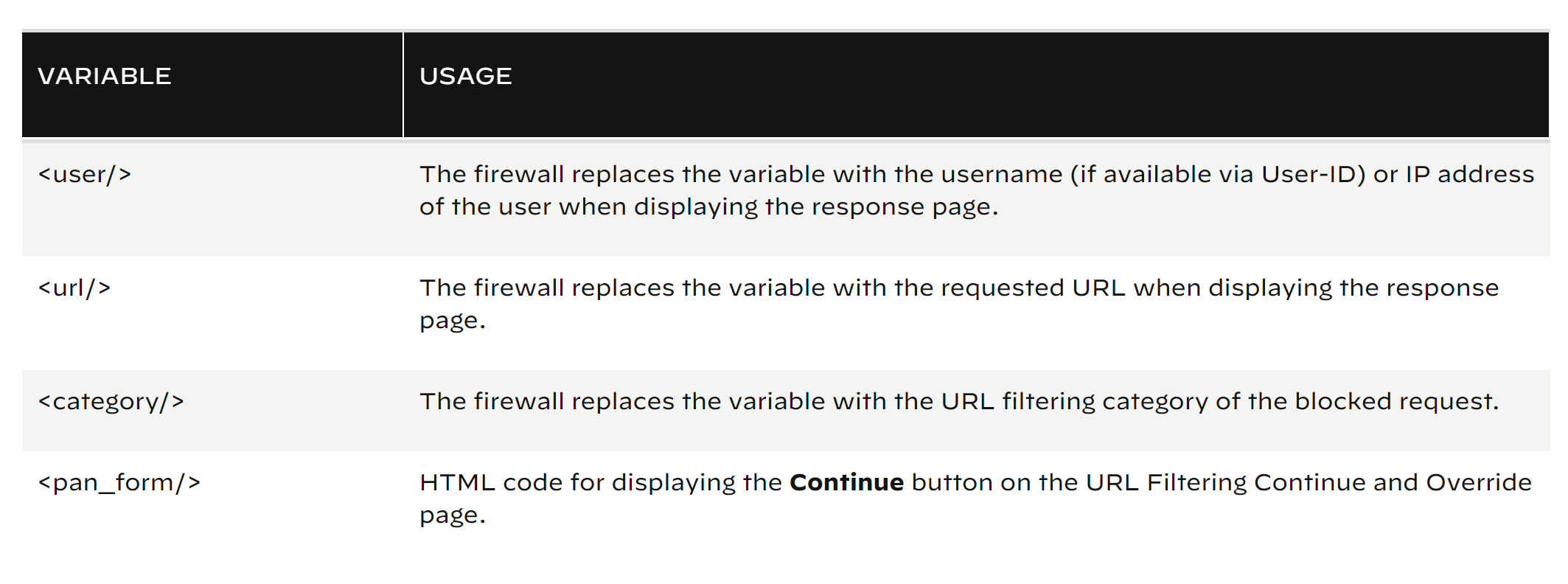
in the following link you can read about how to add javascript code that triggers the firewall to display different messages depending on what URL category the user is attempting to access:
This is what we will use for our unknown users. If user unknown we get a response page where the username is the IP address of the user:
If the User is known we get the username:
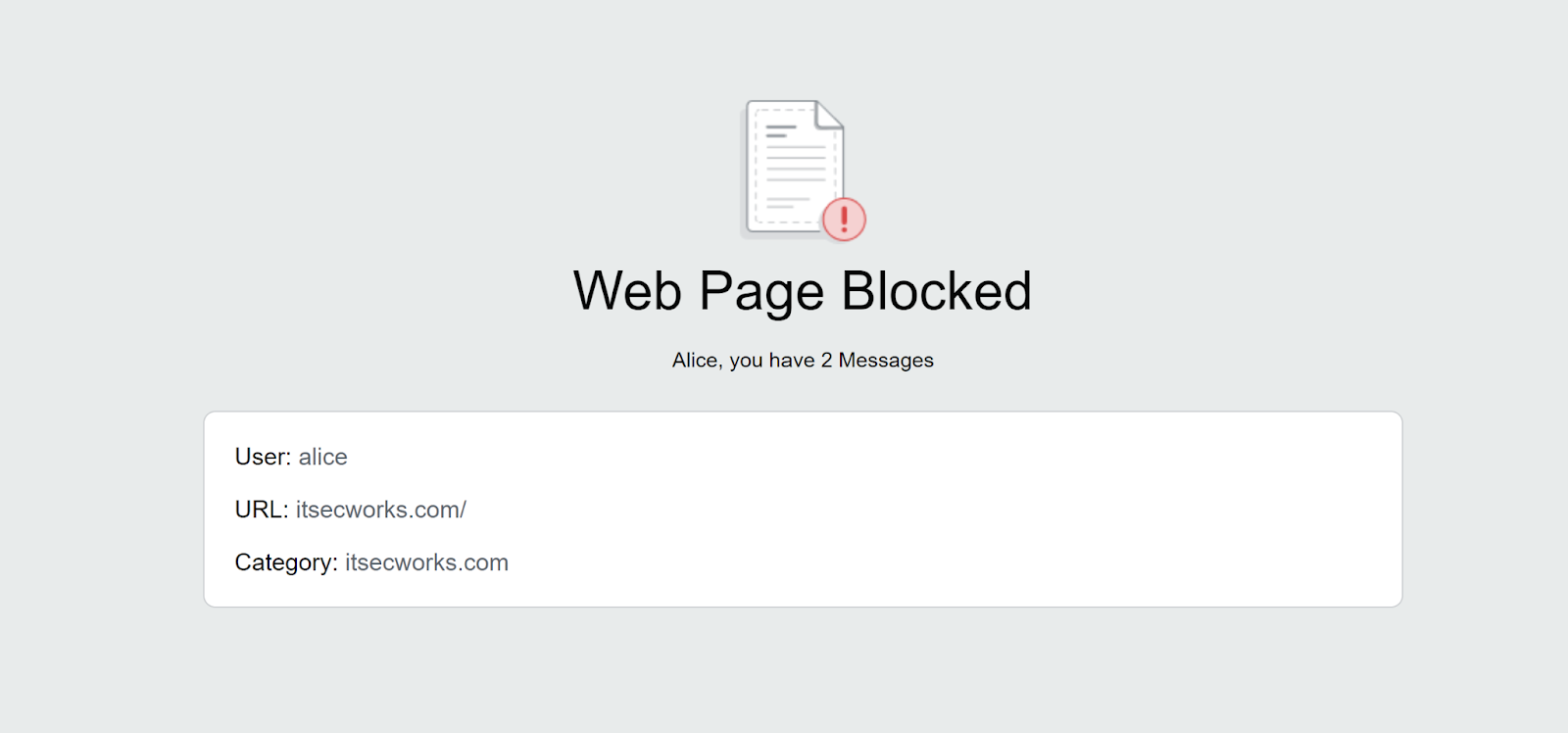
This is what we use in the response page in js:
        function ValidateIPaddress(ipaddress) {
          if (/^(25[0-5]|2[0-4][0-9]|[01]?[0-9][0-9]?)\.(25[0-5]|2[0-4][0-9]|[01]?[0-9][0-9]?)\.(25[0-5]|2[0-4][0-9]|[01]?[0-9][0-9]?)\.(25[0-5]|2[0-4][0-9]|[01]?[0-9][0-9]?)$/.test(ipaddress)) {
            return (true)
          }
          return (false)
        }

        var username = "<user/>";
        switch(username)
        {
            case 'bob':
            document.getElementById("warningText").innerHTML = "Bob, This Message is for you";
            break;
            case 'alice':
            document.getElementById("warningText").innerHTML = "Alice, you have 2 Messages";
            break;
            case 'carol':
            document.getElementById("warningText").innerHTML = "Carol, you have 3 Messages";
            break;
        }
        if (ValidateIPaddress(username)) {
            document.getElementById("warningText").innerHTML = "Dear user, We are not able identify you. Please goto the Captive Portal or login with Global Protect to identify yourself.";
        }
The switch for usernames in the script is just a test to generate different content based on different usernames, the key is the last if statement. If the username is an IP address we clearly found somebody who is not identified correctly, because the Global Protect is not running or the user has not used the Captive Portal or something else. For those users we can generate a customized response page where we can instruct them which should be the correct way to get access. This is my test response page for them:

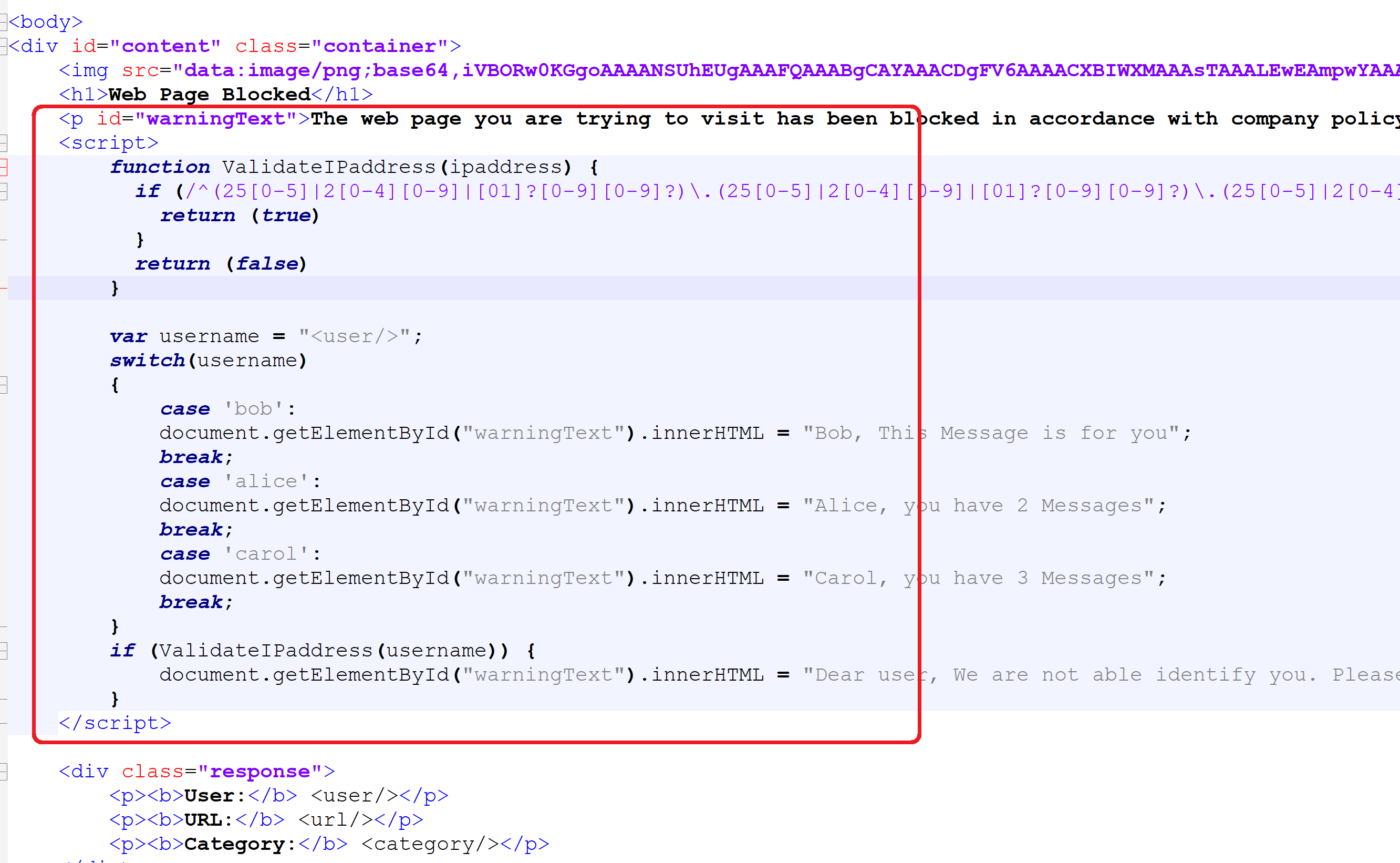
I just put the js into the HTML body like this on the response page and uploaded the custom response page to the firewall and did a commit:
Thats is the trick, its pretty simple actually. I hope you enjoyed it and it was again something worth for a coffee break.

 itsecworks
Posted on September 7, 2023
0